

本人计划在飞牛nas中部署打印服务实现局域网打印并尝试反向代理实现远程打印
在局域网内使用任意终端软件或者含终端的程序进行代码部署
在飞牛界面开启SSH功能,使用终端连接飞牛系统并 sudo -i 获取root权限
1、安装 cups :sudo apt-get install cups -y
2、编辑 CUPS 的配置文件 :nano /etc/cups/cupsd.conf
复制下面代码替换cupsd.conf原内容
#
# Configuration file for the CUPS scheduler.  See "man cupsd.conf" for a
# complete description of this file.
#

# Log general information in error_log - change "warn" to "debug"
# for troubleshooting...
LogLevel warn
PageLogFormat

# Specifies the maximum size of the log files before they are rotated.  The value "0" disables log rotation.
MaxLogSize 0

# Default error policy for printers
ErrorPolicy retry-job

# Only listen for connections from the local machine.
# Listen localhost:631
Listen 0.0.0.0:631
Listen /run/cups/cups.sock

# Show shared printers on the local network.
Browsing Yes
BrowseLocalProtocols dnssd

# Default authentication type, when authentication is required...
DefaultAuthType Basic

# Web interface setting...
WebInterface Yes

# Timeout after cupsd exits if idle (applied only if cupsd runs on-demand - with -l)
IdleExitTimeout 60

# Restrict access to the server...
<Location />
  Order allow,deny
  Allow all
</Location>

# Restrict access to the admin pages...
<Location /admin>
  Order allow,deny
  Allow all
</Location>

# Restrict access to configuration files...
<Location /admin/conf>
  AuthType Default
  Require user @SYSTEM
  Order allow,deny
  Allow all
</Location>

# Restrict access to log files...
<Location /admin/log>
  AuthType Default
  Require user @SYSTEM
  Order allow,deny
  Allow all
</Location>

# Set the default printer/job policies...
<Policy default>
  # Job/subscription privacy...
  JobPrivateAccess default
  JobPrivateValues default
  SubscriptionPrivateAccess default
  SubscriptionPrivateValues default

  # Job-related operations must be done by the owner or an administrator...
  <Limit Create-Job Print-Job Print-URI Validate-Job>
    Order deny,allow
  </Limit>

  <Limit Send-Document Send-URI Hold-Job Release-Job Restart-Job Purge-Jobs Set-Job-Attributes Create-Job-Subscription Renew-Subscription Cancel-Subscription Get-Notifications Reprocess-Job Cancel-Current-Job Suspend-Current-Job Resume-Job Cancel-My-Jobs Close-Job CUPS-Move-Job>
    Require user @OWNER @SYSTEM
    Order deny,allow
  </Limit>

  <Limit CUPS-Get-Document>
    AuthType Default
    Require user @OWNER @SYSTEM
    Order deny,allow
  </Limit>

  # All administration operations require an administrator to authenticate...
  <Limit CUPS-Add-Modify-Printer CUPS-Delete-Printer CUPS-Add-Modify-Class CUPS-Delete-Class CUPS-Set-Default CUPS-Get-Devices>
    AuthType Default
    Require user @SYSTEM
    Order deny,allow
  </Limit>

  # All printer operations require a printer operator to authenticate...
  <Limit Pause-Printer Resume-Printer Enable-Printer Disable-Printer Pause-Printer-After-Current-Job Hold-New-Jobs Release-Held-New-Jobs Deactivate-Printer Activate-Printer Restart-Printer Shutdown-Printer Startup-Printer Promote-Job Schedule-Job-After Cancel-Jobs CUPS-Accept-Jobs CUPS-Reject-Jobs>
    AuthType Default
    Require user @SYSTEM
    Order deny,allow
  </Limit>

  # Only the owner or an administrator can cancel or authenticate a job...
  <Limit Cancel-Job CUPS-Authenticate-Job>
    Require user @OWNER @SYSTEM
    Order deny,allow
  </Limit>

  <Limit All>
    Order deny,allow
  </Limit>
</Policy>

# Set the authenticated printer/job policies...
<Policy authenticated>
  # Job/subscription privacy...
  JobPrivateAccess default
  JobPrivateValues default
  SubscriptionPrivateAccess default
  SubscriptionPrivateValues default

  # Job-related operations must be done by the owner or an administrator...
  <Limit Create-Job Print-Job Print-URI Validate-Job>
    AuthType Default
    Order deny,allow
  </Limit>

  <Limit Send-Document Send-URI Hold-Job Release-Job Restart-Job Purge-Jobs Set-Job-Attributes Create-Job-Subscription Renew-Subscription Cancel-Subscription Get-Notifications Reprocess-Job Cancel-Current-Job Suspend-Current-Job Resume-Job Cancel-My-Jobs Close-Job CUPS-Move-Job CUPS-Get-Document>
    AuthType Default
    Require user @OWNER @SYSTEM
    Order deny,allow
  </Limit>

  # All administration operations require an administrator to authenticate...
  <Limit CUPS-Add-Modify-Printer CUPS-Delete-Printer CUPS-Add-Modify-Class CUPS-Delete-Class CUPS-Set-Default>
    AuthType Default
    Require user @SYSTEM
    Order deny,allow
  </Limit>

  # All printer operations require a printer operator to authenticate...
  <Limit Pause-Printer Resume-Printer Enable-Printer Disable-Printer Pause-Printer-After-Current-Job Hold-New-Jobs Release-Held-New-Jobs Deactivate-Printer Activate-Printer Restart-Printer Shutdown-Printer Startup-Printer Promote-Job Schedule-Job-After Cancel-Jobs CUPS-Accept-Jobs CUPS-Reject-Jobs>
    AuthType Default
    Require user @SYSTEM
    Order deny,allow
  </Limit>

  # Only the owner or an administrator can cancel or authenticate a job...
  <Limit Cancel-Job CUPS-Authenticate-Job>
    AuthType Default
    Require user @OWNER @SYSTEM
    Order deny,allow
  </Limit>

  <Limit All>
    Order deny,allow
  </Limit>
</Policy>

# Set the kerberized printer/job policies...
<Policy kerberos>
  # Job/subscription privacy...
  JobPrivateAccess default
  JobPrivateValues default
  SubscriptionPrivateAccess default
  SubscriptionPrivateValues default

  # Job-related operations must be done by the owner or an administrator...
  <Limit Create-Job Print-Job Print-URI Validate-Job>
    AuthType Negotiate
    Order deny,allow
  </Limit>

  <Limit Send-Document Send-URI Hold-Job Release-Job Restart-Job Purge-Jobs Set-Job-Attributes Create-Job-Subscription Renew-Subscription Cancel-Subscription Get-Notifications Reprocess-Job Cancel-Current-Job Suspend-Current-Job Resume-Job Cancel-My-Jobs Close-Job CUPS-Move-Job CUPS-Get-Document>
    AuthType Negotiate
    Require user @OWNER @SYSTEM
    Order deny,allow
  </Limit>

  # All administration operations require an administrator to authenticate...
  <Limit CUPS-Add-Modify-Printer CUPS-Delete-Printer CUPS-Add-Modify-Class CUPS-Delete-Class CUPS-Set-Default>
    AuthType Default
    Require user @SYSTEM
    Order deny,allow
  </Limit>

  # All printer operations require a printer operator to authenticate...
  <Limit Pause-Printer Resume-Printer Enable-Printer Disable-Printer Pause-Printer-After-Current-Job Hold-New-Jobs Release-Held-New-Jobs Deactivate-Printer Activate-Printer Restart-Printer Shutdown-Printer Startup-Printer Promote-Job Schedule-Job-After Cancel-Jobs CUPS-Accept-Jobs CUPS-Reject-Jobs>
    AuthType Default
    Require user @SYSTEM
    Order deny,allow
  </Limit>

  # Only the owner or an administrator can cancel or authenticate a job...
  <Limit Cancel-Job CUPS-Authenticate-Job>
    AuthType Negotiate
    Require user @OWNER @SYSTEM
    Order deny,allow
  </Limit>

  <Limit All>
    Order deny,allow
  </Limit>
</Policy>Windows系键盘:Ctrl+S – 回车 – Ctrl+X 退出;Mac系键盘Control+S – 回车 – Control+X 退出
3、添加管理员:sudo usermod -a -G lpadmin 用户名 ;这里的用户名是你登录飞牛的用户名,后面登录 cups 账号使用的账号密码就是你的飞牛账号密码
4、安装 hplip 驱动文件 :apt-get install hplip
5、重启 cups :service cups restart
6、设置打印机安装插件:hp-setup -i
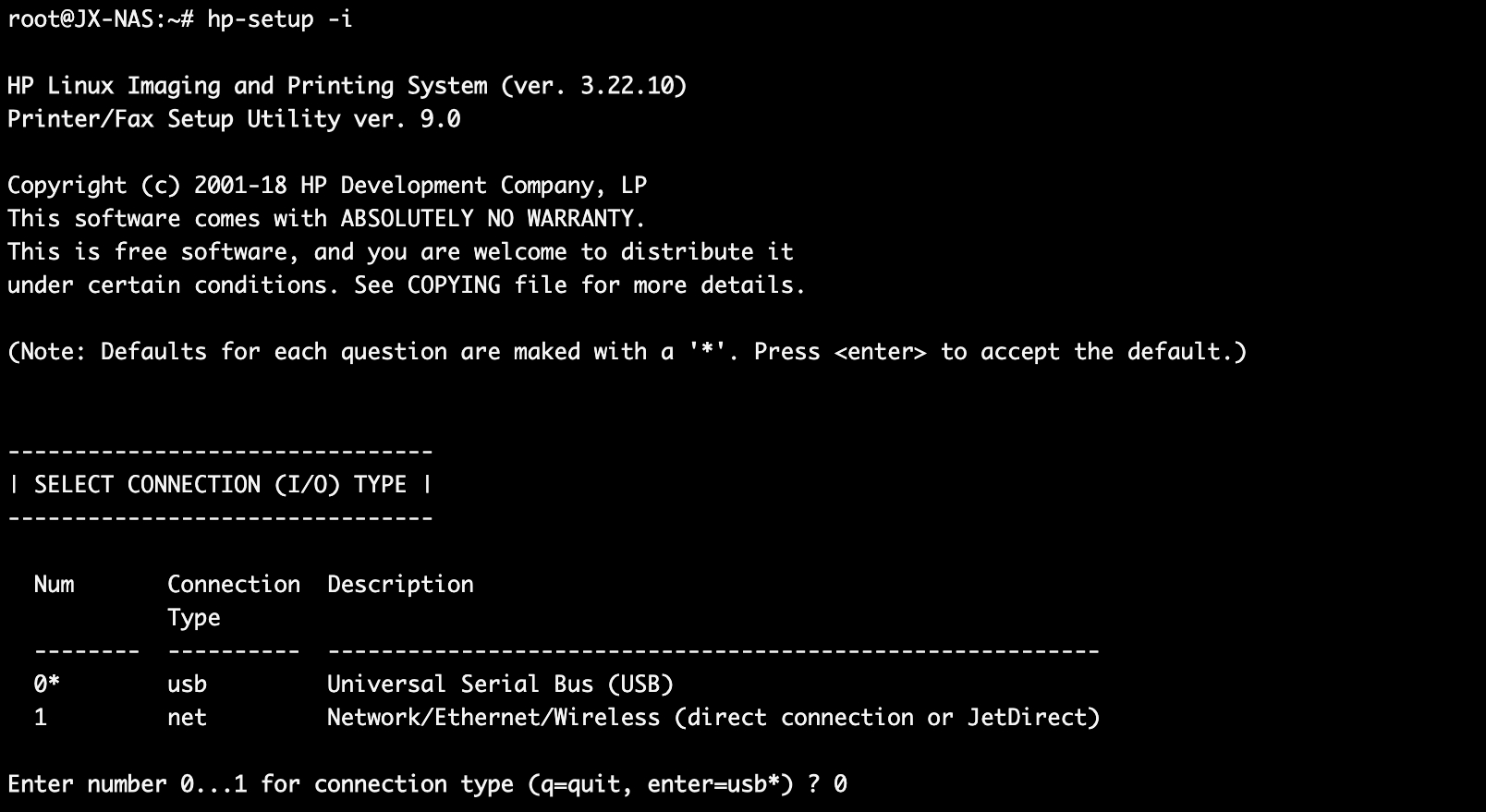
6.1 :输入 0 回车,这是选择链接方式;我们选USB连接,会自动发现连接的打印机
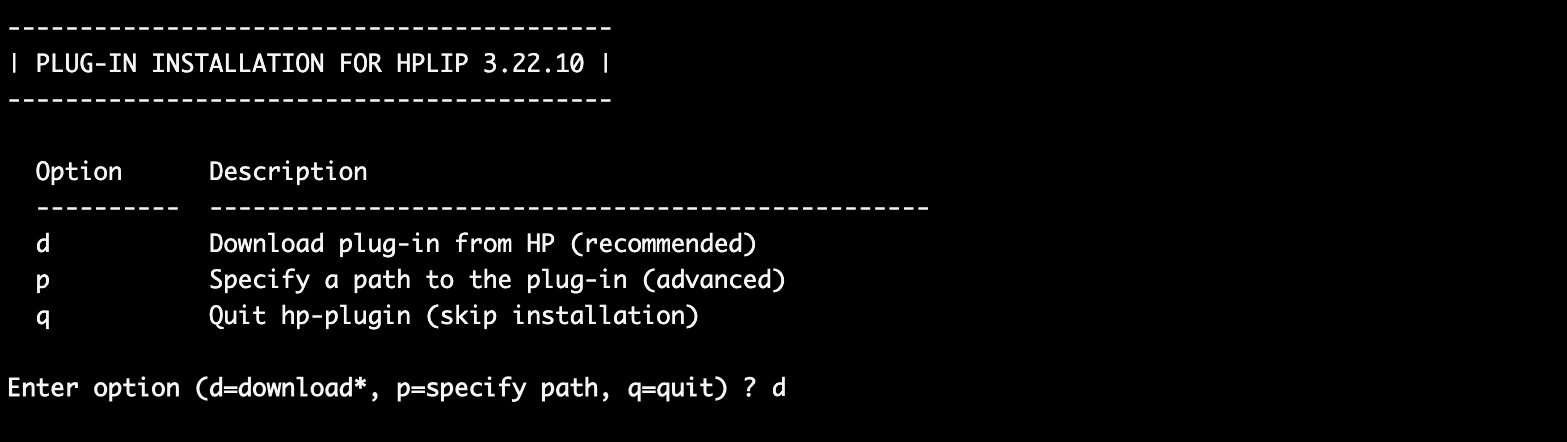
6.2 :输入 d 回车:(d 是默认从HP官网进行下载,可能会报错;报错就输入 p 然后输入文件路径)
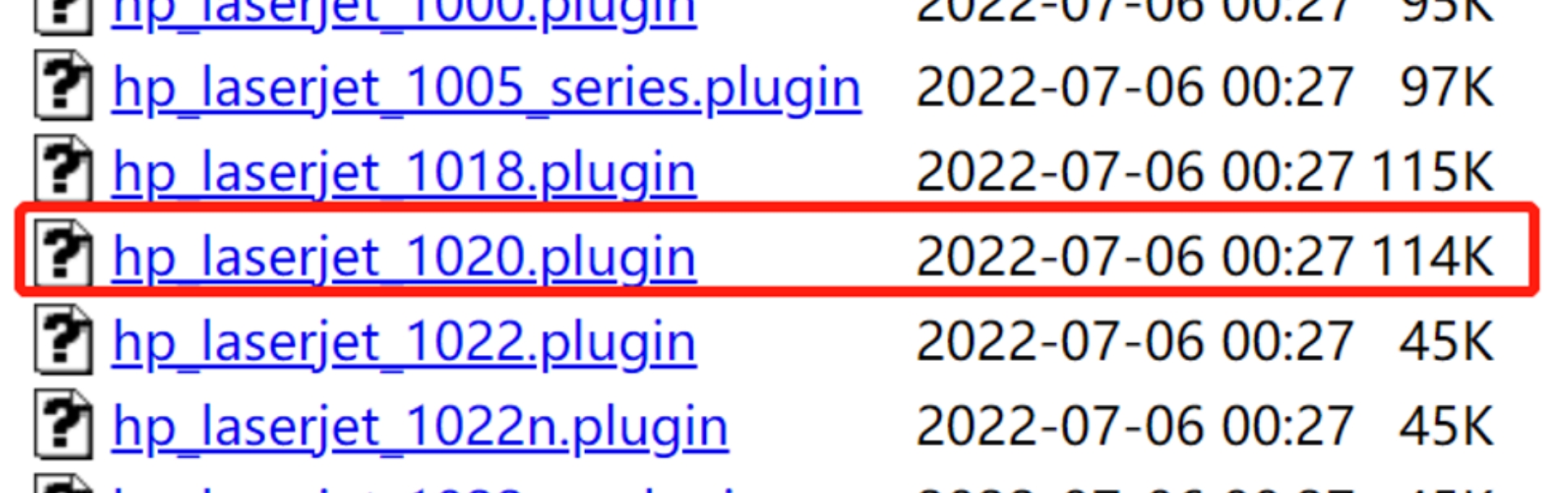
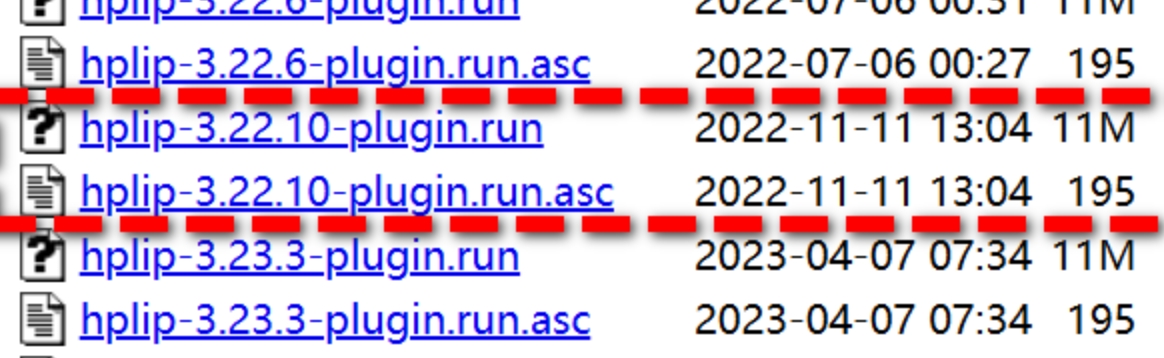
- 需要在这个网站 https://www.openprinting.org/download/printdriver/auxfiles/HP/plugins/ 下载三个文件,
- 在飞牛中新建一个hp文件夹用于保存下载的三个文件
- 右键查看hp文件夹路径如:/vol1/1000/hp、/vol2/1000/hp等格式
- 在6.2步骤中输入p后输入hp文件夹路径
7、重启 cups:service cups restart
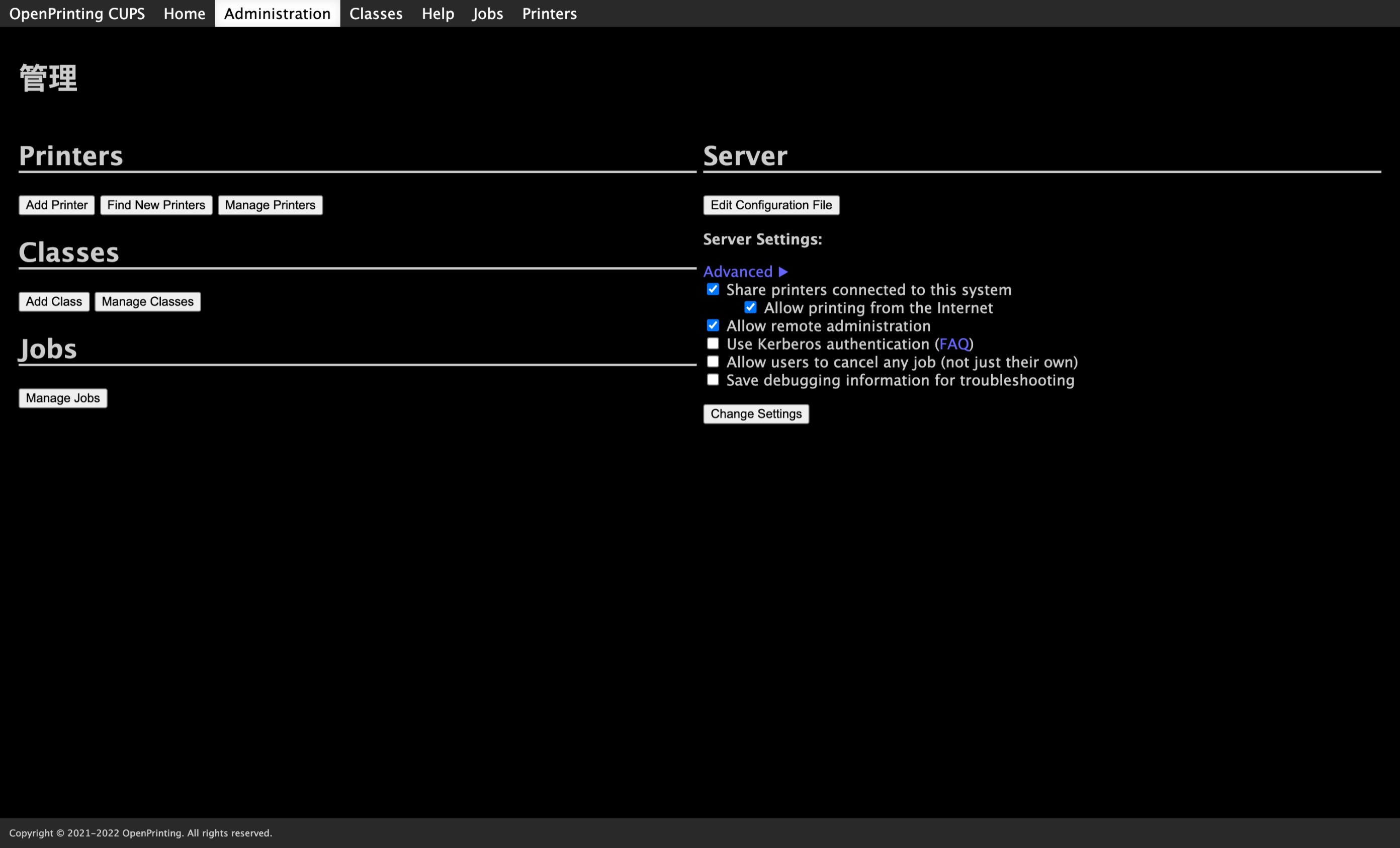
8、打开 cups 网站:https://飞牛地址:631/admin
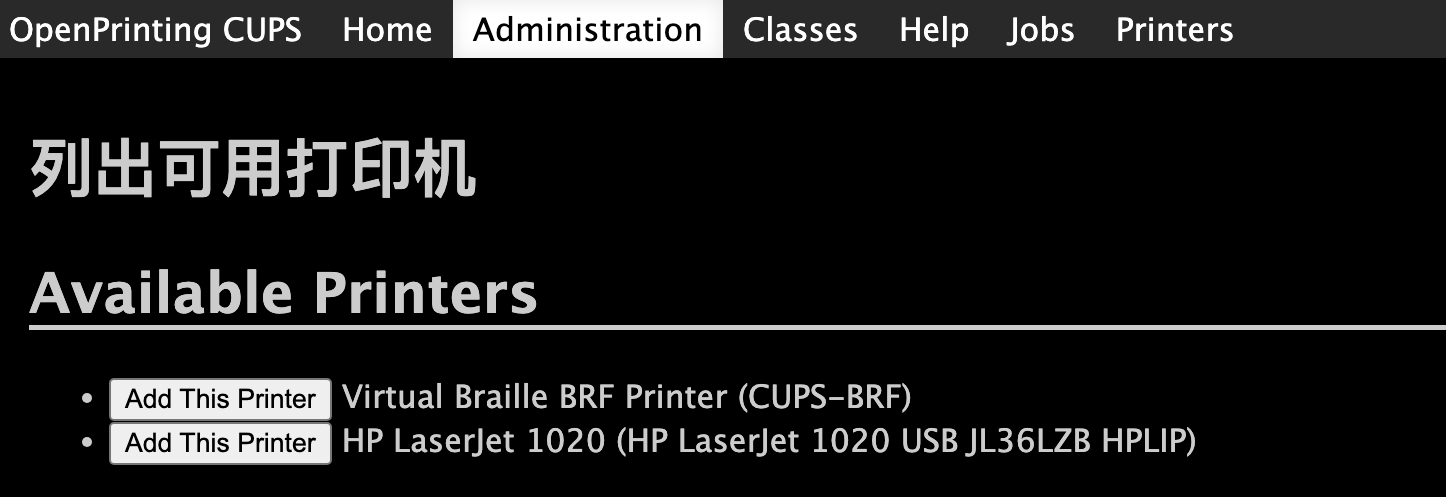
- 点击 Find New Printers
- 选择 HP LaserJet 1020 (HP LaserJet 1020 USB JL36LZB HPLIP)
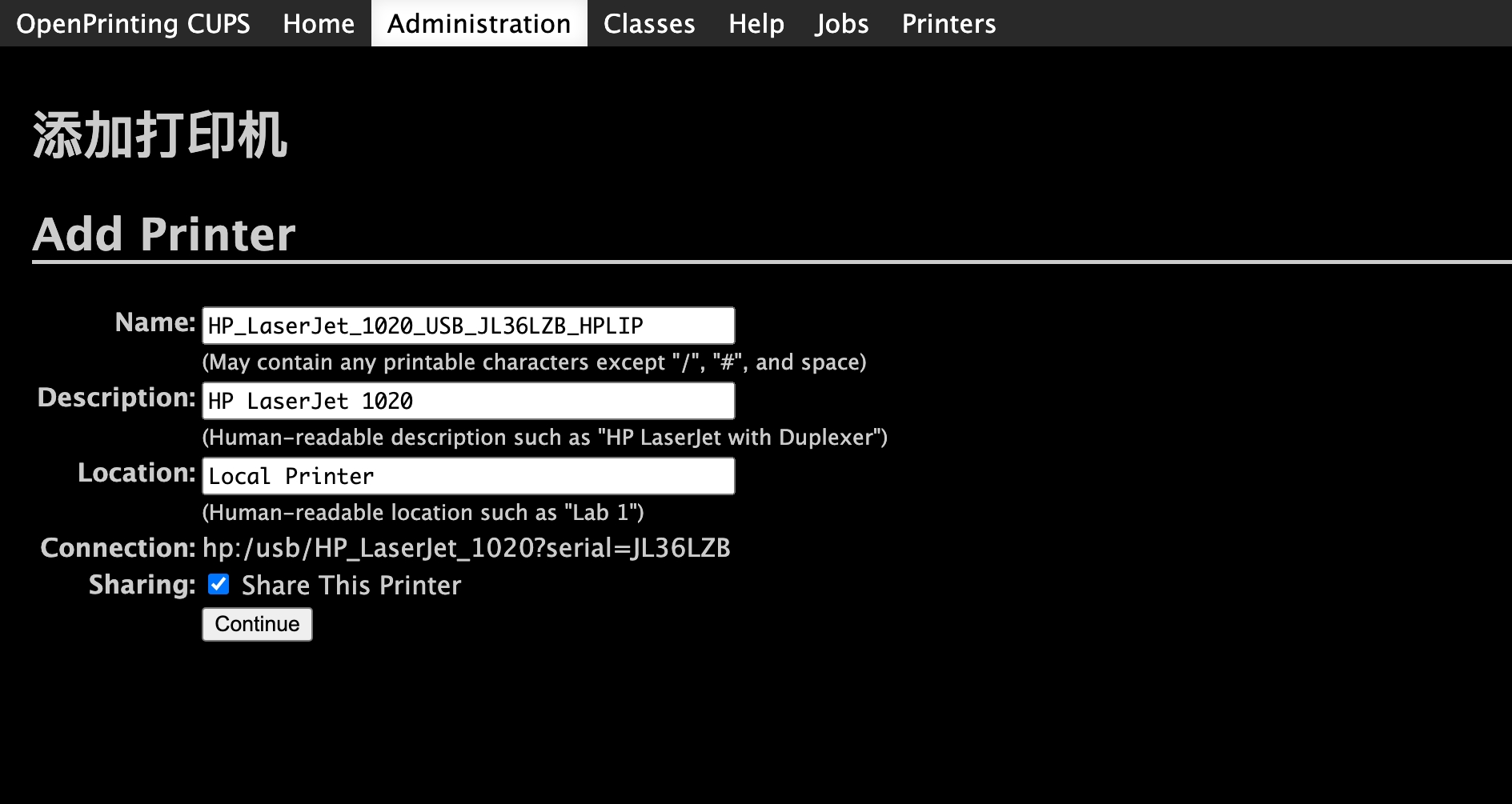
- 必须勾选 Share This Printer 才可以在局域网内找到打印机,勾选后点击Continue
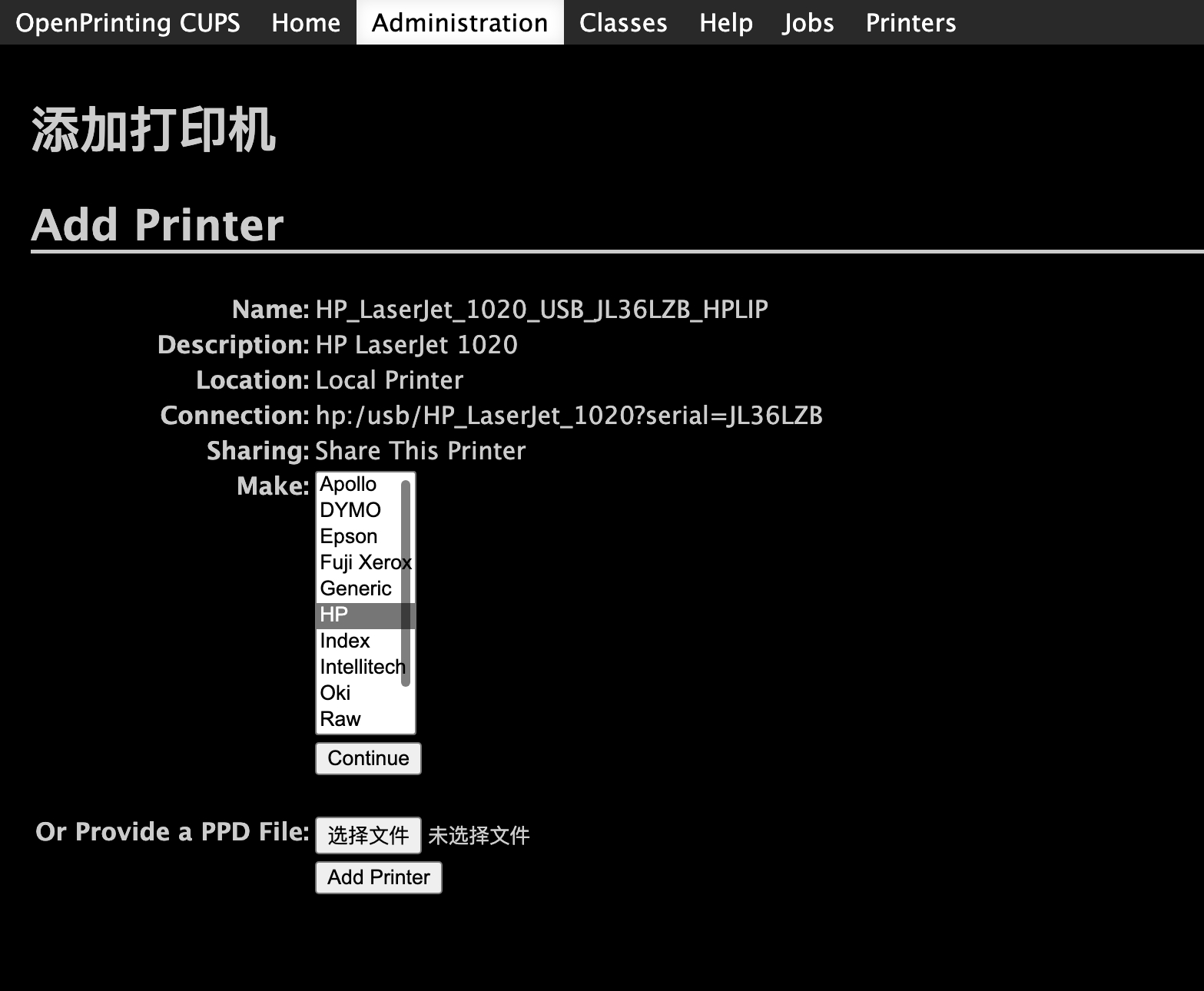
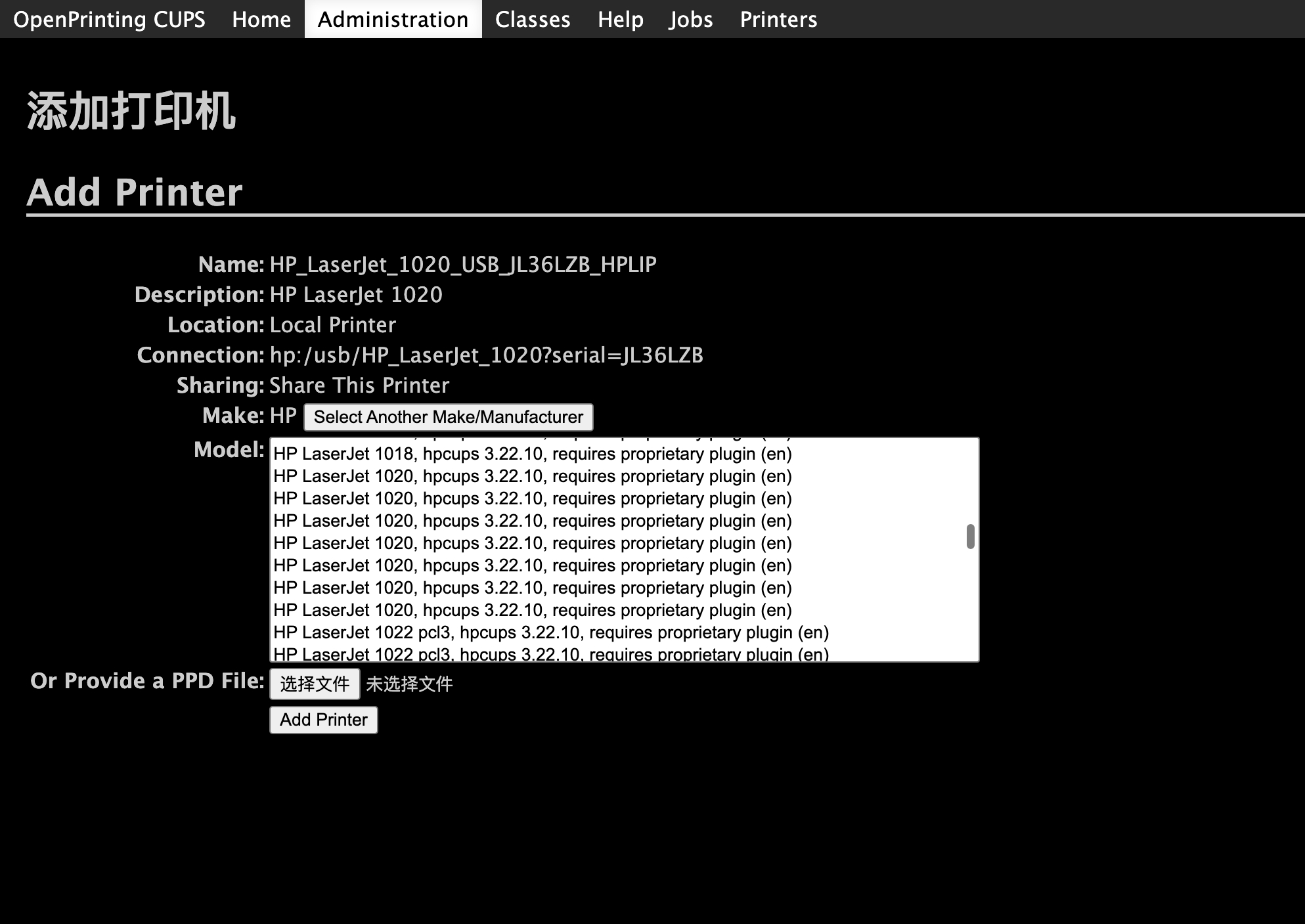
- 在Make选择 HP 点击 Add Printer
- 在Model下滑选框找到驱动文件,名字如:
HP LaserJet 1020, hpcups 3.22.10, requires proprietary plugin (en)随便选一个驱动后点击Add Printer
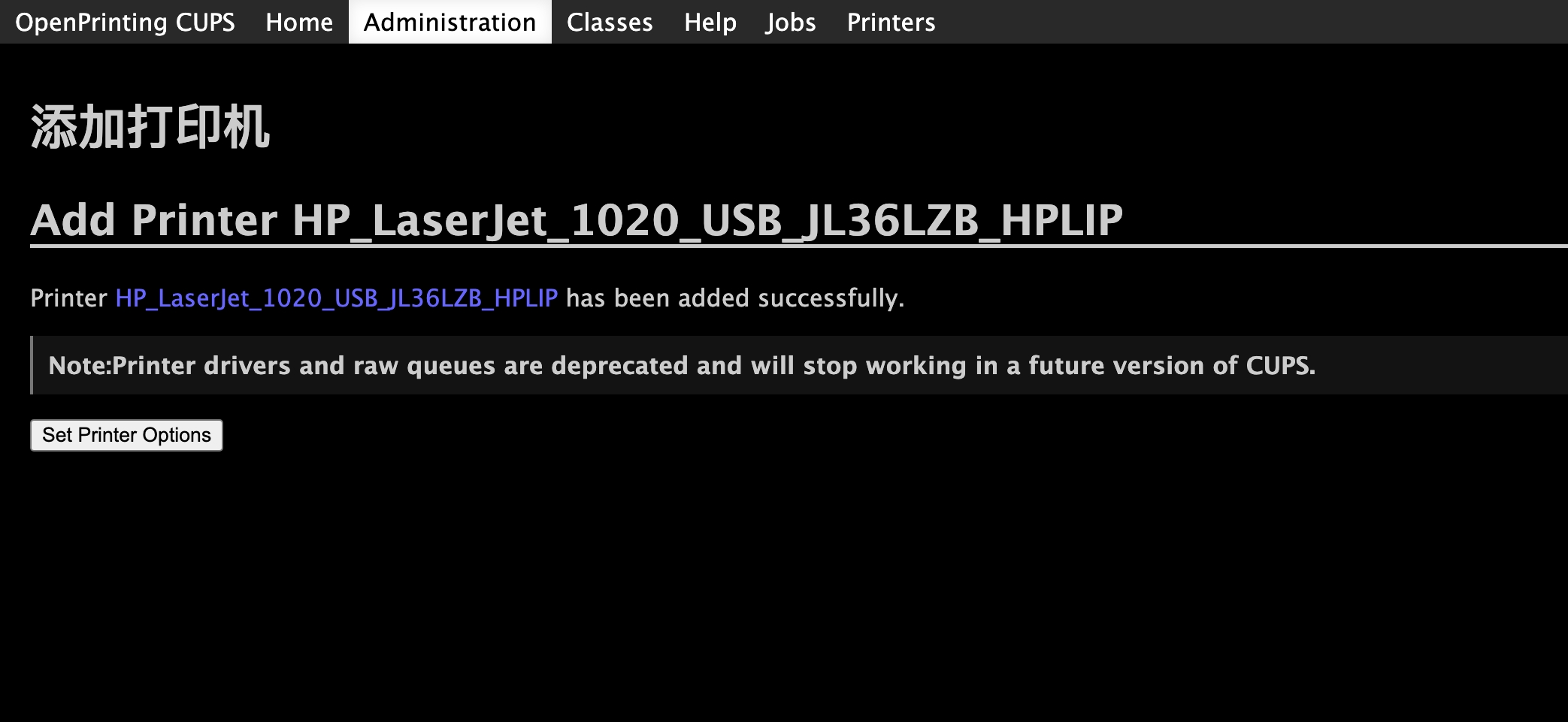
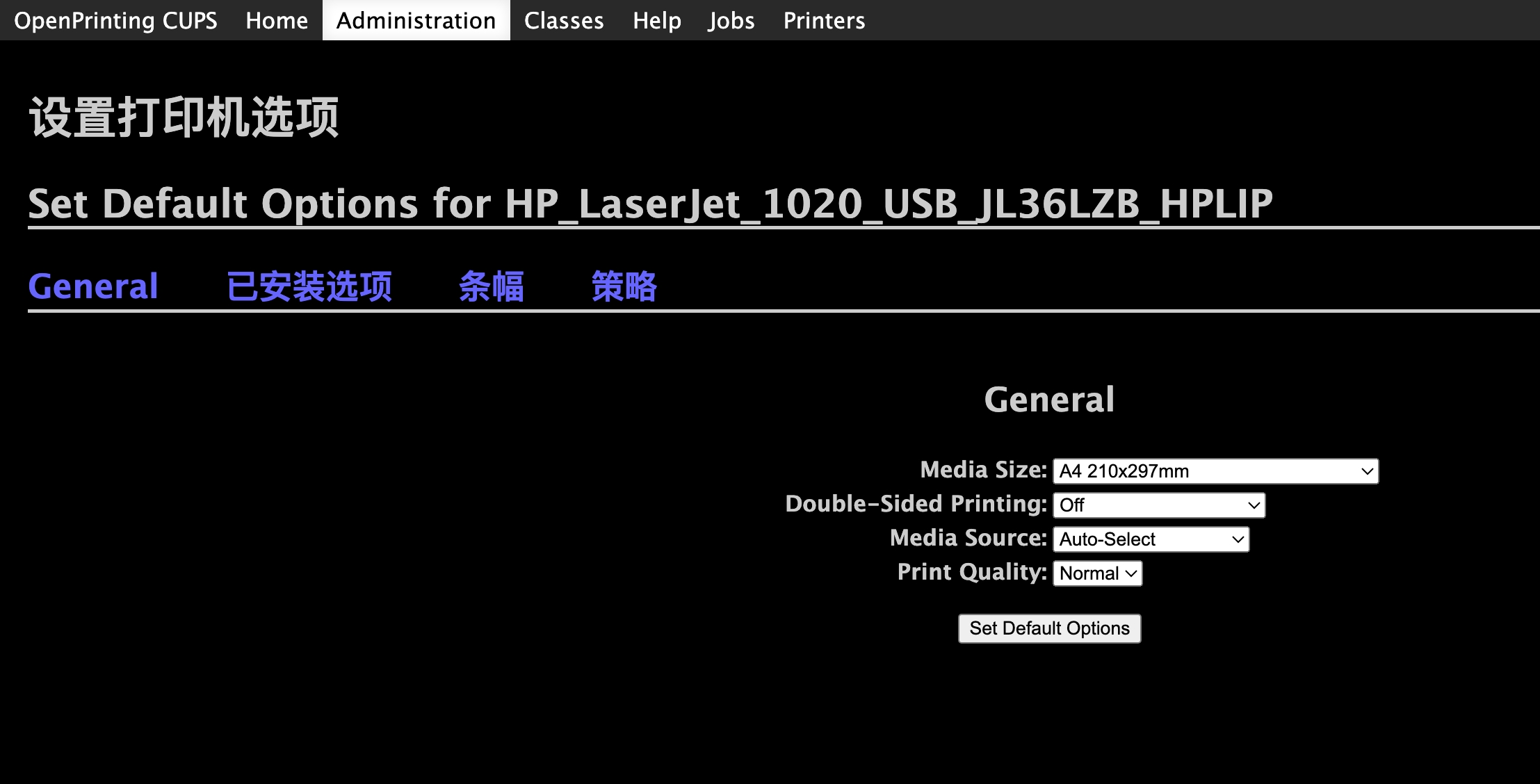
- 点击Set Printer Options,设置打印纸
- General-Media Size:选择 A4 210x297mm
- General-:默认 off
- 点击 Set Default Options 完成
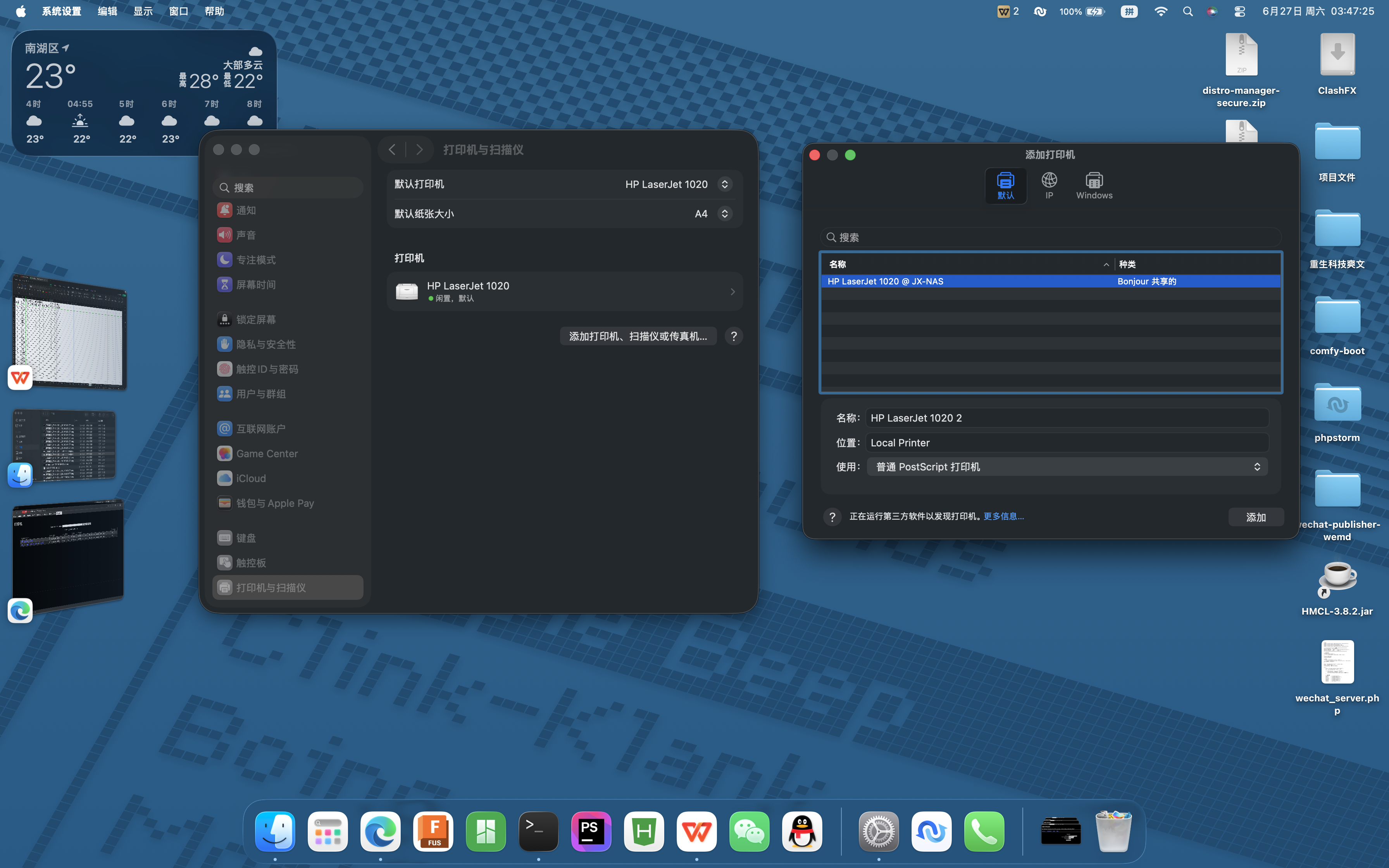
9、只在局域网使用到这里就完成了,只需要去设备端添加打印机就行,Mac添加打印机会自动搜索到、Windows也差不多
10、反向代理
因我在飞牛上安装了1panel面板,直接在面板设置比较方便
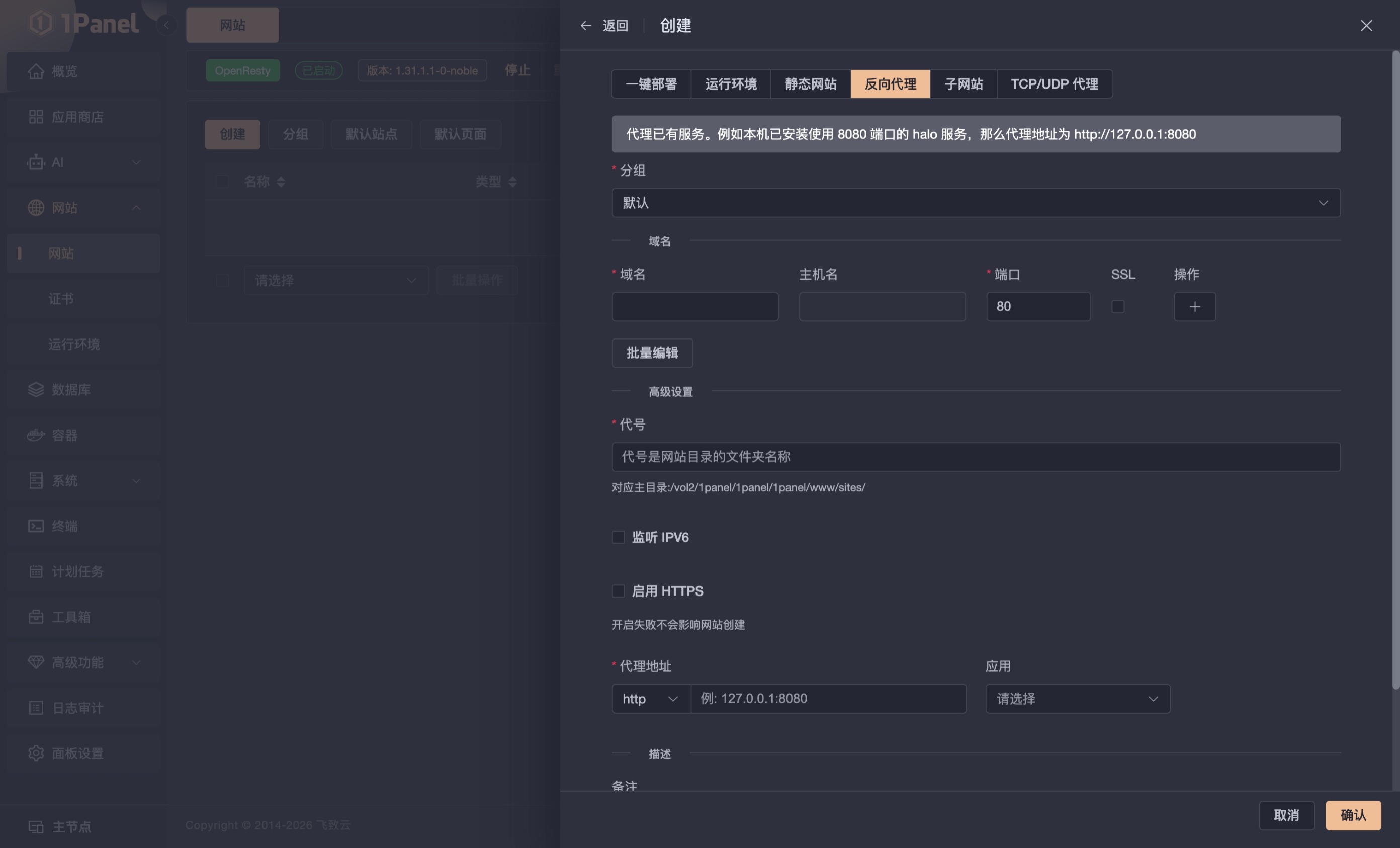
该功能前提是你得有一个域名,并使域名解析到你的飞牛ip上
© 版权声明
分享是一种美德,转载请保留原链接!
本站所有文章,如无特殊说明或标注,均为本站原创发布。
任何个人或组织,在未征得本站同意时,禁止复制、盗用、采集、发布本站内容到任何网站、书籍等各类媒体平台。
如若本站内容侵犯了原著者的合法权益,可联系我们进行处理。
本站所有文章,如无特殊说明或标注,均为本站原创发布。
任何个人或组织,在未征得本站同意时,禁止复制、盗用、采集、发布本站内容到任何网站、书籍等各类媒体平台。
如若本站内容侵犯了原著者的合法权益,可联系我们进行处理。